Desktop Overlay for Age of Empires II: DE
AoE2 Insta Scout
Instant opponent scouting overlay for Age of Empires II: DE
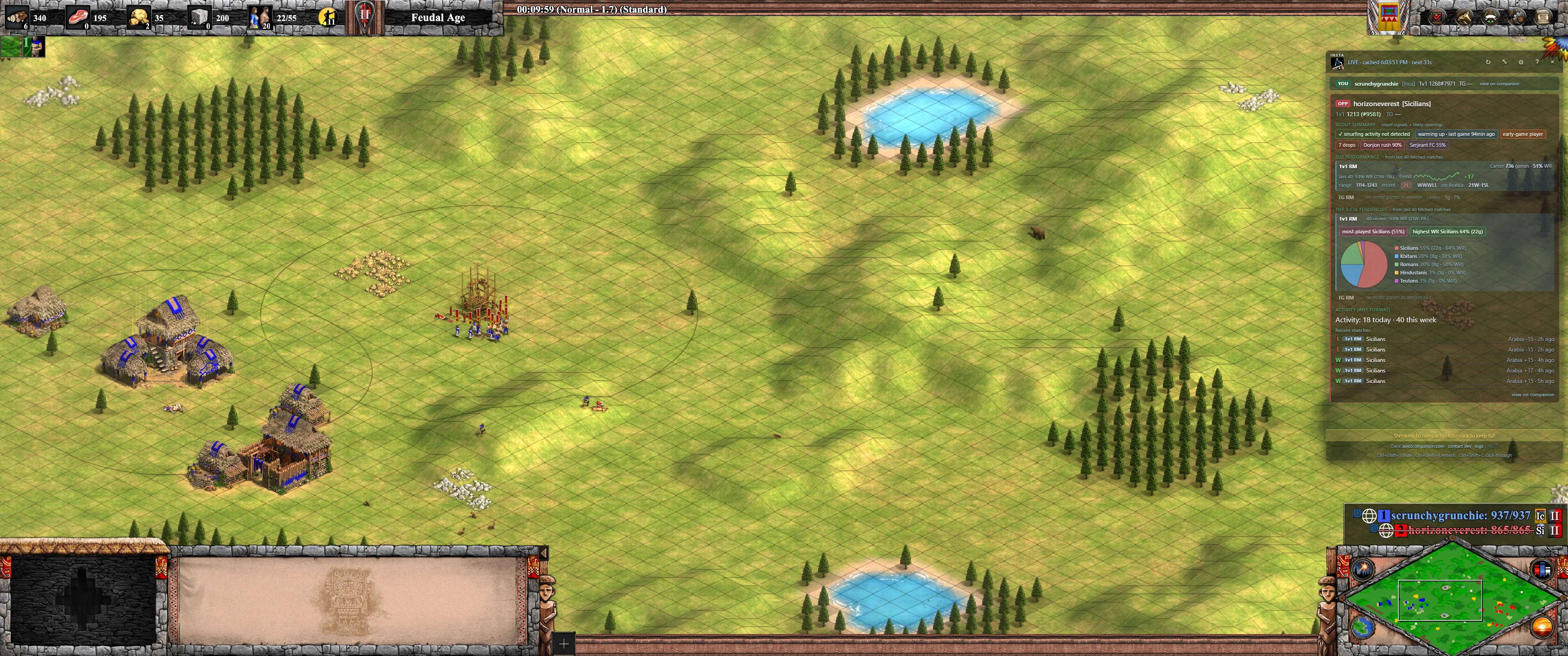
Sits in the top right corner while you play. Auto-shrinks to a compact view when you tab out.
Who is this guy? Once the match loads, you can see your opponent’s rating, what civs they actually pick, and how their last few matches went. Right on top of the game.
Screenshots
Why bother?
- You’re 1000 ELO facing 1200. Prepare to lose. Play looser. Win anyway.
- You’re 1500 ELO facing 1300. Tighten up so you don’t throw to a Lithuanians knight rush.
- They’ve picked the same civ 18 of their last 20 games. You know the build that’s coming.
- They’re on a 0 and 5 streak. Confidence boost is free.
- You can spot the smurf on your team in team games and figure out who’s actually carrying.
- Match starting at 3 AM. Now you know whether you’re facing a hardcore grinder or another insomniac.
- Quick review after a match. What civ did they punish you with, what was their rating change.
- Saves you tabbing over to your phone every 15 minutes.
Install in 3 steps
- Download the .exe Grab the portable .exe (no install) or pick the NSIS/MSI installer from the releases page.
- Click past Windows SmartScreen Windows will warn you because I haven’t paid for a signing certificate ($200 a year for one person’s hobby is a lot). Hit More info → Run anyway.
- Queue a match Stats show up about 15 seconds after the loading screen starts. They don’t show during the civ selection lobby because companion’s data only surfaces once the match actually launches. Works in any display mode.
What you see per opponent
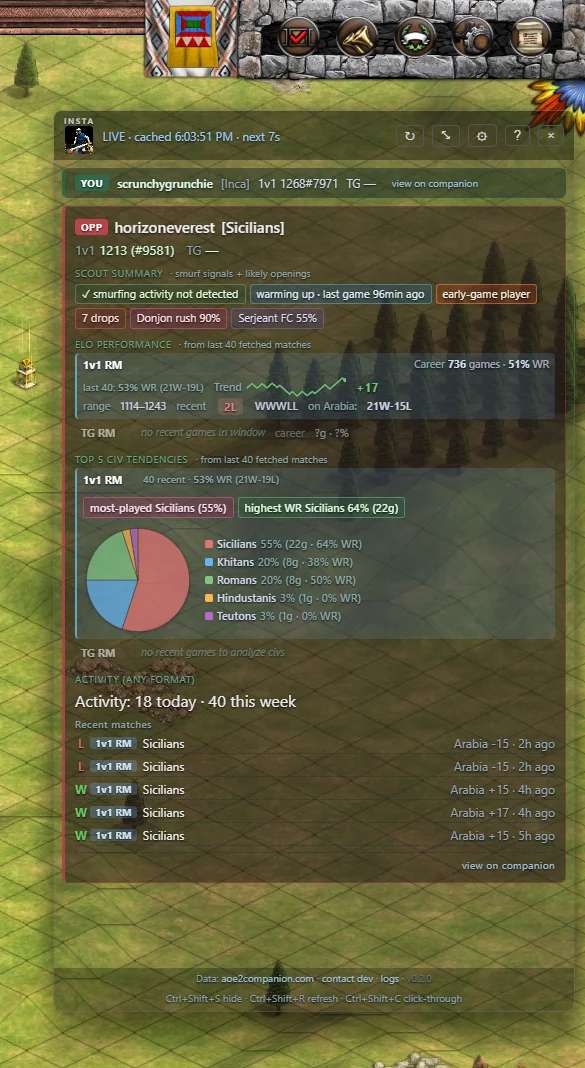
Each opponent card is split into four sections, all derived from their last 40 matches plus their career rank data:
Scout summary
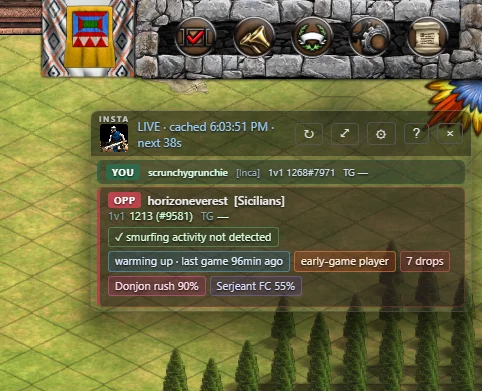
- Smurf probability (0–95%) from ELO trend, games count, win streak, and recent winrate. Hover for the signals behind it.
- Session state: fresh session, warming up, deep grind. Detected from the timing of their recent matches.
- Playstyle: early / mid / late-game player, based on their most-played civ.
- Likely openings by their civ pick: Tower rush, Donjon rush, Fast scouts, Drush FC, M@A flush, Knight rush, etc. Confidence adjusts based on how often they pick that civ, their winrate with it, and their average game length.
- Drops badge — rage-quit signal from companion.
ELO performance (per format)
- Career games, lifetime winrate, current win/loss streak — from companion’s 1v1 and TG ranks separately, so 1v1-only stats don’t pollute TG and vice versa.
- Inline sparkline trend chart over their last 10 games in that format, with net ELO change.
- Rating range (min–max) over the window. Last 5 W/L sequence with the current streak as a colored badge.
- Record on the current match’s map within that format. e.g. “Arabia 6W-2L”.
Top 5 civ tendencies (per format)
- Pie chart of their top 5 civs by play share, with a legend showing share %, games, and per-civ winrate.
- Most-played vs highest WR civ called out separately. Different signals: the civ they default to vs the civ they actually win with.
- Flex picker label when no civ dominates (under 25% share).
- Mirror civ alert — if their most-played in this format matches the civ you picked this match, the card flags it.
Activity (any format)
- Games played today and this week — spot the binge player or the well-rested grinder.
- Detailed verbose list of their last 5 matches with format tag (1v1/TG), civ, map, ELO change, and time-ago.
The format-row matching the current match is highlighted and sorted to the top. Your own stats sit in a compact bar above the opponents, and the panel switches to a faded “last match” view after the game ends so you can review before queueing again.
How it works
- Read
HKCU\Software\Valve\Steam\ActiveProcess\ActiveUserto resolve your SteamID64. - Poll
data.aoe2companion.com/api/nightbot/match(fast, ~10–15s indexing) and/api/matches?profile_ids=<you>(canonical, ~30–60s indexing) in parallel. Whichever surfaces first wins. - For each player in the match, fire three concurrent calls: 1v1 rank, TG rank, and 40 most-recent matches. The canonical match endpoint gives us each player’s
profile_idup front, so we use it directly instead of a fuzzy name search (which used to return the wrong “Berni” among many). - Render. All per-format stats (top civs, trend, range, map record, best by winrate) are computed client-side from the 40-match window grouped by leaderboard. Cache the whole snapshot under the
matchIdso the same match never refetches. - Repoll on an adaptive schedule: 90s while idle hunting for a new match (down from 10s, to be kind to companion’s backend), 45s while a match is live, 60s after the match ends. A “Check now” button appears 10 seconds after each idle poll so you can short-circuit it the moment you queue.
- An in-app update banner polls GitHub’s releases API once on boot — if you’re behind the latest, a dismissible yellow banner appears.
First card on screen is usually about 15 seconds after queue pop. The hard floor is aoe2companion’s own indexing. Nothing on the client side can shortcut it without bypassing them and hitting Microsoft’s Relic backend directly, which would risk getting users’ Xbox accounts banned.
Hotkeys
- Ctrl+Shift+S toggle between full and compact view
- Ctrl+Shift+R force refresh (clears cache)
- Ctrl+Shift+C let mouse clicks pass through to the game
Buttons in the title bar do the same thing. A gear icon opens a settings panel where you can pick exactly which sections show in full vs. compact mode.
Compared to alternatives
| Tool | Auto-detect opp | Per-format split | Best civ by WR | Mirror alert | Trend chart | In-game |
|---|---|---|---|---|---|---|
| aoe2companion (web/mobile) | manual lookup | partial | - | - | post-game | browser/phone |
| aoe2insights.com | manual lookup | - | - | - | - | browser |
| Discord !opp bots | chat command | - | - | - | - | chat only |
| CaptureAge | spectator | - | - | - | - | spec client |
| OBS browser-source overlays | partial | - | - | - | - | viewer only |
| Insta Scout | ✓ | ✓ | ✓ | ✓ | ✓ | ✓ |
The raw data is the same as aoe2companion (their public API). The differences: zero clicks per match, per-format breakdown side by side, surfaces signals (best civ by winrate, mirror alerts, inline trend charts) the other tools don’t synthesize. Pinned to your game window so you can read it without tabbing out.
Data sources
- aoe2companion. Everything you see on a card. Same endpoints their mobile app uses, same data anyone else can pull. My HTTP requests identify the app and link back to the repo so their maintainer can reach me if I’m being a bad citizen.
- Your Steam registry. One local read to figure out which Steam account is logged in. Doesn’t leave your machine.
That’s the whole network footprint. No analytics, no error reporting, no account, no microsoft/xbox calls. Source on GitHub, MIT licensed.
FAQ
Will I get banned?
Nobody has, that I know of. The app reads only public stats and doesn’t touch the game at all. It’s a separate window pulling from the same place aoe2companion’s site does. Plenty of streamers show this data on stream without issue.
Is this a cheat?
It tells you nothing you couldn’t see by tabbing over to aoe2companion on your phone. It doesn’t read game memory, doesn’t click for you, doesn’t touch the client. It just saves you the tab switch.
Microsoft Store / Game Pass version?
Not yet. I rely on Steam specific registry entries to find your account, and Microsoft Store uses a different identity flow. Want this fixed? Ping me.
Tech stack
Tauri 2 + Rust backend, vanilla HTML/CSS/JS in the webview, no build step on the frontend. Native Win32 calls (GetForegroundWindow, registry) instead of shelling out. Portable build is a single ~6 MB .exe; MSI/NSIS installers are ~2–3 MB. Rewritten from an Electron prototype that was ~80 MB.
Known limits
- Clicking the overlay pulls you out of the game. AoE2DE doesn’t share focus with overlays. Use Ctrl+Shift+C so clicks pass through to the game, or just don’t click the overlay during the match.
- The pass through clicks toggle is sticky. Once enabled, toggling it back off while the game has focus doesn’t always take. If the overlay won’t respond to clicks, minimize the game window and click the overlay once to restore focus, then toggle again.
- Doesn’t work in the lobby. Companion’s endpoint only surfaces a match once it’s actually starting (loading screen). You won’t see opponent stats while civs are being picked or while you’re still in queue. Stats appear about 10 to 30 seconds into the loading screen.
- Hovering over a name in the game doesn’t do anything. The game window captures all input. No third party tool has solved this without injecting a DLL into the game, which can get you banned.
- Windows only, Steam only. Tested only on Windows with the Steam version of AoE2DE. No Xbox or Microsoft Store or Game Pass support, because their identity flow is different and I haven’t worked it out. Mac and Linux not even attempted.
- Opening prediction is heuristic, not replay-based. Predictions are inferred from civ pick + their play history. Actual build-order detection would need replay parsing, which isn’t in scope.
Shipped in v0.2.0
- Scout summary: smurf probability, session state, playstyle tag, likely-opening prediction with confidence %, drops badge
- Civ tendencies pie chart with share %, games, per-civ winrate
- Most-played vs highest-WR civs called out separately
- Per-format breakdown (1v1 / TG side by side, never mixed)
- ELO trend sparkline charts per format
- Map-specific record on the current match’s map
- Mirror civ alert when their main matches your pick
- Activity counts (today / this week)
- 10 languages with official AoE2DE civ names: English, Español, Deutsch, Français, Italiano, Português (BR), Русский, Polski, 中文, 한국어
- Settings panel: pick what each mode shows, change language
- In-app update notifier on boot
- “Check now” button to short-circuit the 90s idle poll
- Empty-state placeholders so cards never collapse during enrichment
- Privacy: focus log no longer captures window titles, safe to attach to bug reports
Full notes: CHANGELOG.md
Roadmap
- Head-to-head history vs current opponent
- Microsoft Store / Game Pass version support
- Civ matchup winrate (your civ vs their civ specifically)
- Best/worst map per format
- Auto-download updates (currently you click through the banner)